
Deals, Discounts and Upsells
Discounts and deals can serve as a potent marketing strategy when wielded effectively, enticing customers with cost savings while enhancing brand loyalty.


Lesson 5: Apply Deals, Discounts and Upsells
Once you’ve fine-tuned your listing title, description, and images, and implemented dynamic pricing, your listing is ready to stand out.
Now, let’s focus on tailoring pricing for each guest. Leveraging discounts and deals effectively can be a game-changer in converting search exposure to bookings.oss bookings, 2x gross profit, 2x repeat business.
3 min. – Reading time
Why offer discounts
You may wonder: “I’ve adjusted my pricing and offered seasonal discounts, why consider more discounts? Shouldn’t I aim to maximise revenue?”
While you’ve successfully attracted guests to your listing pages with competitive prices, this alone may not always seal the deal.
When travellers are exposed to several similar listings, they often need further incentives to make the booking with you. That’s why you need deals and discounts to prompt last minute or advance bookings, and bookings from a mobile device.
Types of guest deals & discounts
The short-term rentals industry has a set of default discount types that you can configure:
-
- Early bird / last minute
- Longer stays
- Country discounts (Booking.com)
- Mobile discounts (Agoda, Booking.com and Expedia)
- Member deals (Expedia)
Early bird / last minute discounts
This is the rate discount for bookings made outside a certain window before the check-in date. Typically, early bird discounts are available 30 days or more before check-in, while last-minute discounts are applicable within a 1 – 7 day booking window.
Some hosts avoid early bird discounts altogether, while giving a definitive 10-20% discount for a last minute booking. Others offer both types of discounts.
Find a sweet spot for your listing and your seasonality. Consider applying a gradually increasing last-minute discount structure like the one below:
10% discount for bookings within 7 days before check-in
15% discount for bookings within 3 days
20-25% discount for bookings within 1 day
Longer stay discounts
Utilise this discount for bookings exceeding 14 days. While not applicable to all travel personas, it can appeal to digital nomads or remote workers seeking extended stays.
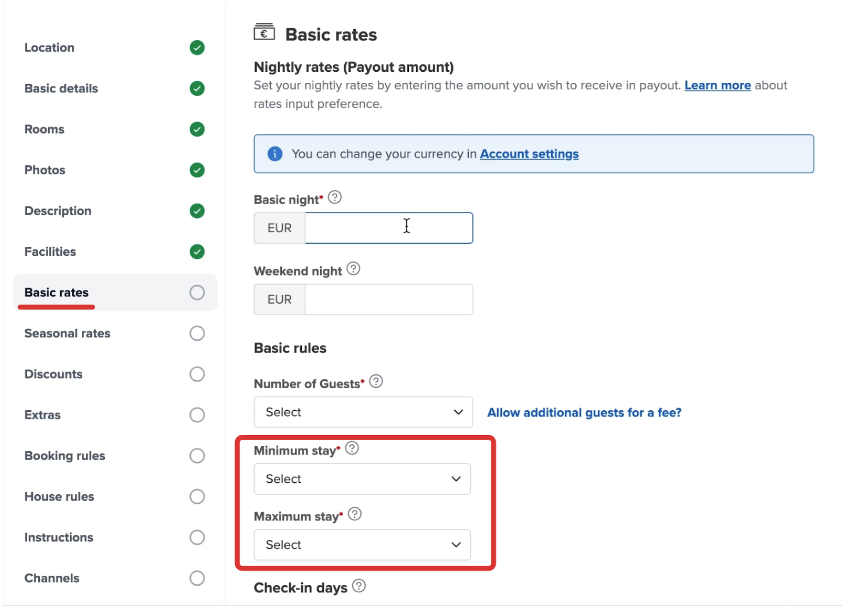
Important: Adjust the minimum booking period to enable guests to benefit from the extended-stay discount. In Your.Rentals this is done in the Basic rates > Minimum and maximum stay.
Mobile rate discounts
Did you know that the majority of bookings made on major OTAs like Booking.com are made through mobile devices?
You can apply mobile discounts of 10% or higher to be available only to mobile users on Agoda, Booking.com, and Expedia to increase your likelihood of getting a mobile booking by over 30%.
When a mobile discount is applied, your listings will get a badge and stand out on those platforms. Guests expect the listings with ‘Mobile-only price’ badge to be 10% cheaper and in many cases prioritise them.
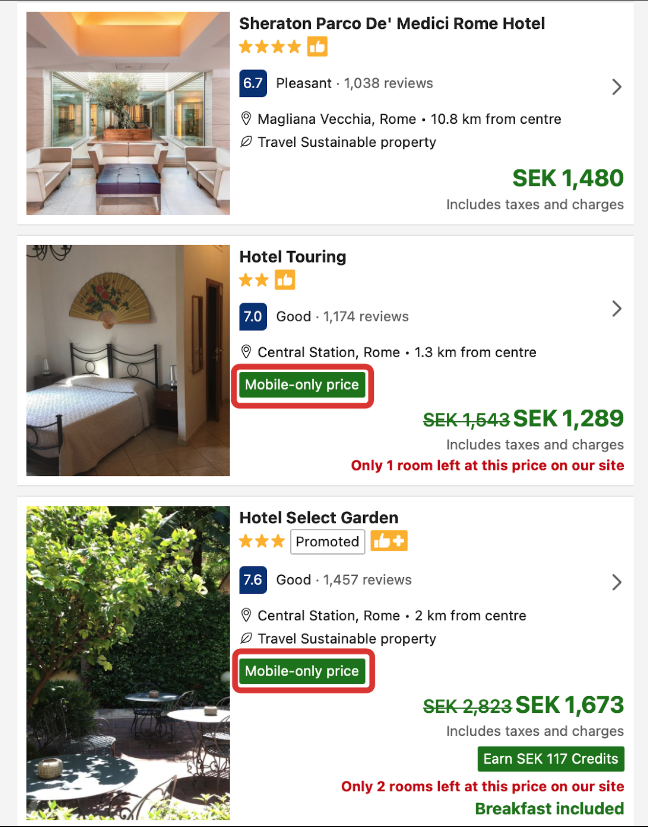
“Targeting mobile users is more important than ever, since more and more travellers are using mobile devices both when planning future trips and booking spontaneously.” – Booking.com
How to set Deals & Discounts
1. In Your.Rentals app go to Listings > Edit your listing (pen icon) > Discounts.
2. Create discounts that you want to add.
3. Saved discounts will be shared across all channels where your listing is listed at.

Your.Rentals
Your.Rentals is your All-in-one short term rental management solution. Manage your property listings, calendars, bookings and payouts on dozens of sites all through one single account – no need for an account on each channel. Simple to use and easy to get started. No sign-up fee, no subscription and no additional price per listing. You only pay when you get a booking.
Not using Your.Rentals yet?
Get in touch, or create an account